Finding Your Way Easily Across China’s Bustling Cities

Consult local regulations on controlled substances, as some accepted drugs elsewhere might be prohibited. Never carry prescription levels more than what is justified by your travel. Store medicines dry and cool, especially where it’s damp or hot. The large city hospitals will have staff that can speak English, but this may not be the case of rural clinic. In addition to medicines, it can be clever to carry bandages, antiseptic wipe, insect repellent, and rehydration salts; these things can hardly be found in the unknown wrappings.
Travelling through the big cities and beautiful landscapes in China are memorable experiences, yet the issue most tourists encounter is how to cope in the country without proper maps to guide them through their lives. Google Maps does not work well in the country, and most foreign apps can’t properly update positions. The best news is that there are two reliable tools to use — Apple Maps and Amap — which will enable you to drive freely and confidently along the route.
Apple Maps as a Familiar Starting Point
For iPhone users, Apple Maps is the excellent option in China because it is uncensored and works right away out of the box. The interface is English, which removes most of the guesswork in typing up addresses or directions. Apple Maps is built with Amap data as its background, thus the underlying maps are correct and frequently updated.
Apple Maps works well in driving and walking directions, in addition to showing public transport routes in big cities like Beijing, Shanghai, Guangzhou, Shenzhen. It can drive metro routes, but in certain stations it won’t provide exact exit numbers. Still, for users who are used to a familiar, international-flavor app that works in harmony with iOS, Apple Maps is a solid choice.
As it is built on Amap’s mapping data, Apple Maps will be more accurate in China compared to other parts of the globe where it can fall behind competitors. The partnership makes it a suitable place to begin effortless navigation.

Amap for Local Power with Depth
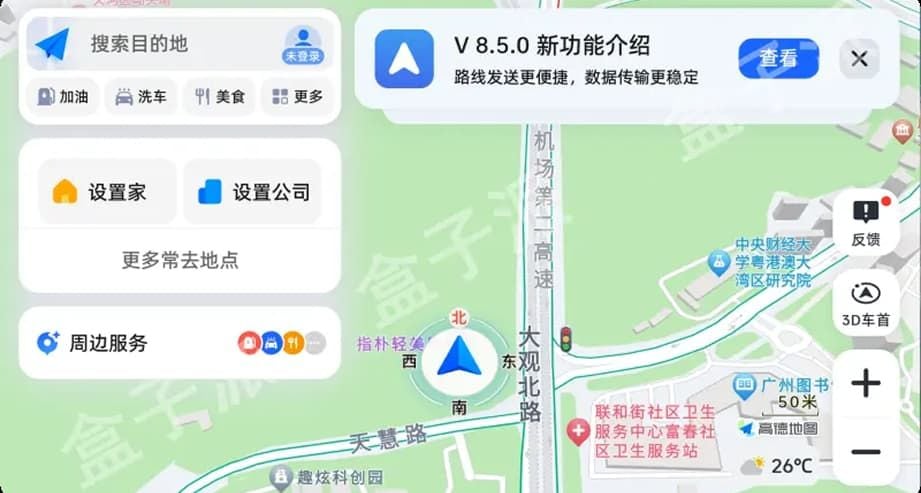
While Apple Maps is handy, Amap is the real heavyweight. It is China’s number one navigation app, used daily by tens of millions of residents. Once downloaded, it provides exquisitely detailed driving, walking, and public transit routes, complete with live traffic status, estimated arrival time, and even countdowns to traffic lights in most cities.
The biggest improvement to international travelers is that Amap supports currently 14 languages, such as English, French, Spanish, Japanese, and Korean among others. Switching the language in settings can allow seeing menus, instructions, and even voice navigation in your own language.
Another strength of Amap is in the field of transportation. Mini maps It displays the full line maps, transfers and the exit of specific stations, which in complex hubs such as Beijing or Guangzhou can save time. In the case of buses, it offers real-time arrival information, which makes it efficient to plan. When driving, it considers real-time traffic and suggests alternative routes based on speed.
How to Make the Most of Both
Using both Apple Maps and Amap at the same time is the optimal method. Apple Maps is perfect for fast lookups in English when you need a familiar structure, whereas Amap provides unsurpassed depth and accuracy once you are accustomed to its features.
Here are a few tips for a beginner:
1. Download both apps before arrival. This way, you have access to them without resorting to local app stores.
2. Replace Amap with your language. Under settings, choose “Language,� and choose one of 14 options.
3. Copy Chinese addresses. While English is enabled, most places are simplest to locate by their Chinese names. Save one in your notes for easy pasting.
4. Use Amap for metro exits. Where there are multiple exits at a station, Amap will most often indicate which one leads directly to proximate landmarks.
5. Combine strengths. If Apple Maps misses a detail, Amap will likely have it.
Practical Scenarios You’ll Encounter
City Streets: Amap can locate not just the streets in large cities such as Shanghai and the People Squares of Anhui but also the shortcuts in the pedestrian areas of the city.
Subway Systems: Apple Maps displays general routes in the subway, whereas Amap provides real-time information, train schedule, and the exit to move to a museum, mall, or park.
Driving Trips: Amap directs you to real-time traffic, automatically rerouting if there is a traffic jam. Apple Maps is a fine quick backup to fall back on.
Walking Tours: Both guide you through parks, historic districts, and new neighborhoods so you never become lost rambling.
Final Thoughts
It has never been easier to navigate China than with the ability of Apple Maps to be easily used coupled with the local knowledge and multilingual capabilities of Amap. You can explore confidently into busy megacities and lesser-known areas too, knowing you have the tools to navigate. With these two apps alone, all travel becomes easier, faster, and less stressful.